

The Echo is the first flight simulator controller from Honeycomb Aeronautical that provides pitch, roll, yaw, AND engine management, without using any desk space. Honeycomb has grown into a common brand for flight sim enthusiasts as well as actual pilots since their first product debuted seven years ago. In that time, they’ve launched an award-winning yoke, a throttle body that does everything except make you coffee, and a (long) awaited set of rudder pedals that completes the trio. The Echo combines the primary features of each preceding hardware piece into a small, handheld device. It’s reminiscent of another device that debuted almost 20 years ago that combined three things into one.
Honeycomb Echo Aviation Controller - Pros
What are some of the benefits the Echo provides to digital pilots? First and foremost, it packs a lot of punch in a small profile. In about a 7” x 5” platform, we have Pitch, Roll, Yaw, Throttle, Prop, Mixture, Flaps, Gear Position, and a Parking Brake at our disposal! The closest similar option would be a flight stick of sorts, but those options require usually about a square foot of desk space. The Echo is comfortable and configurable while at a desk, lounging on a couch, or while you’re at the FBO counting down the minutes until your next training flight.
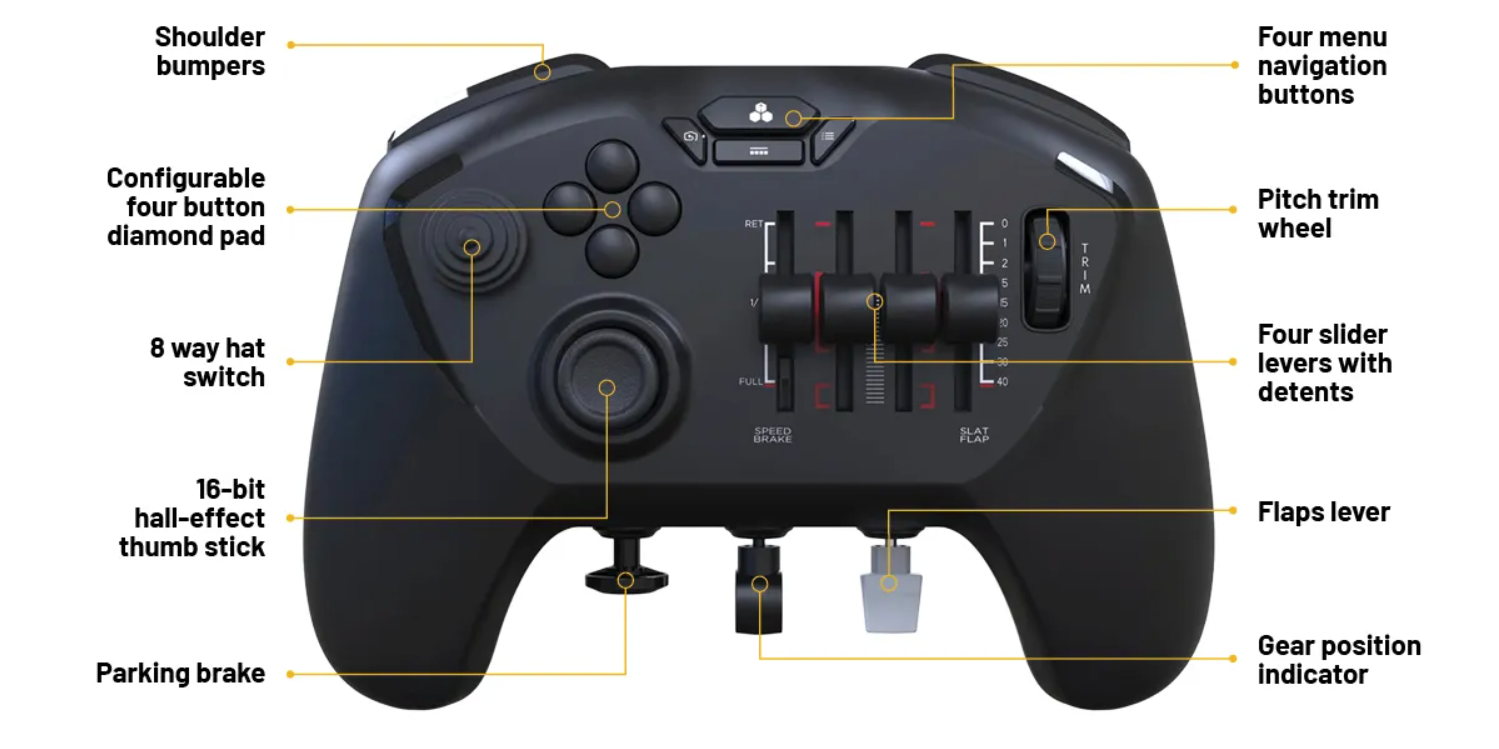
Another side effect of the dense build of the Echo is it can travel easily in a backpack or duffel bag (with its included hard-shell travel case) along with your flight gear or laptop. If you find yourself stuck in the airport terminal thanks to a delay and you have Microsoft Flight Simulator or X-Plane installed on a laptop, you can quickly and easily simulate flight while you wait for your physical flight.
The Echo is also a great option for someone new to or interested in flight simulation who doesn’t have a large budget. With $150, you can quickly and easily take the digital controls of aircraft and better experiment with how you prefer to fly. There are yokes, throttles, and pedals on the market that are two to three times that amount.
Finally, another feature we really like, that is pretty technical, is the counter-swaying paddles on the back of the controller that are intended to provide rudder pedal controls. Just as the pedals in an aircraft counter sway when you press on either pedal, the paddles on the back of the Honeycomb Echo will counter sway too.

Honeycomb Echo Aviation Controller - Cons
No product is perfect and the Honeycomb Echo has one or two things I’d highlight as being less than ideal. The first is a side effect of having a lot of controls in a small space: it’s a little sensitive to fly. Total travel of the Honeycomb Alpha Yoke is 15 cm (5.9 inches) fore and aft for pitch and 18 cm (7.1 inches) for roll (calculated via the circumference of a hand’s resting point on the Alpha yoke). The Honeycomb Echo thumb stick travels a little under one inch in each direction, less than 1/3rd the travel on the yoke, and yet it covers the same range of yoke travel in the digital aircraft. This video explains how to edit the sensitivity of a hardware piece to get closer to what we expect our control inputs to yield in the simulator.
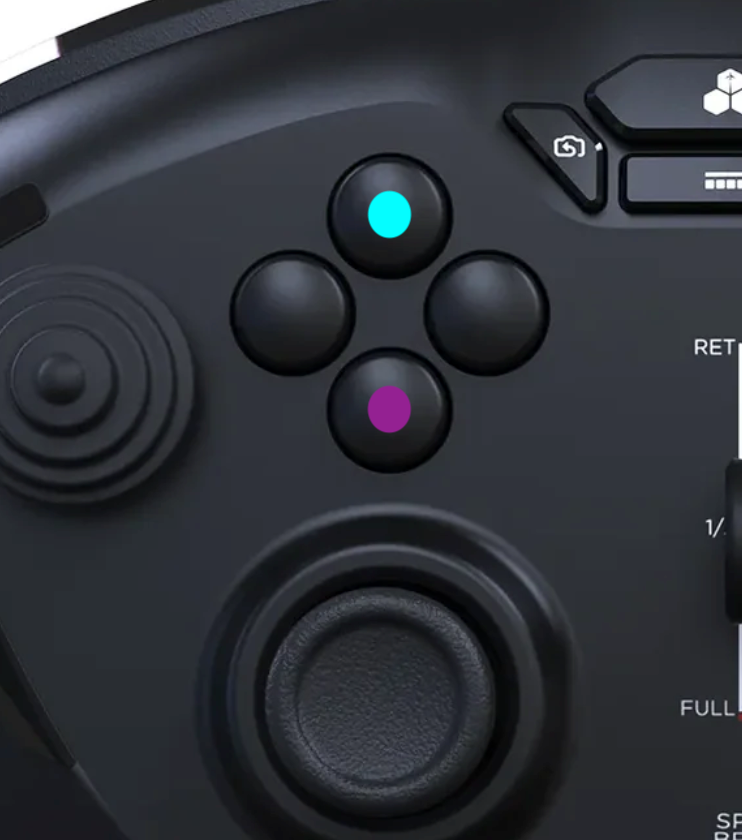
The second area of the Honeycomb Echo I’d upgrade if I had three wishes is the integrated trim wheel on the right side of the controller. Each audible click sends a single button command to the simulator. What I find in my experience is it takes a lot of clicks, or wheel movement, to make a noticeable change in my aircraft’s trim settings. This echoes (pun intended) the prior shortcoming of a sensitivity issue and it’s due to a miniature trim wheel in our controller supposed to simulate a much larger wheel in actual aircraft. My personal work-around is to configure the top and bottom buttons on the diamond pad to electric pitch trim. Pushing the top button (cyan) activates electrical pitch trim nose down, and pushing the bottom button (magenta) activates electrical pitch trim nose up.
I use the buttons as I would with electrical trim on the left side of my yoke in a Cessna 172 for large trim changes. Then I use the trim wheel on the Echo for small edits, such as minor changes when flying an approach, just as I would the physical trim wheel in the Skyhawk.
Honeycomb Echo Aviation Controller - Who It’s Best For
We’ve highlighted some of the pros and cons of the Honeycomb Echo, now let's highlight who would benefit from using the controller.
- New Flight Sim Users - You’ve decided that you’re ready to test out one of the two leading flight sim software programs (Microsoft Flight Simulator 2024 or X-Plane 12), but you refuse to fly a digital aircraft with a keyboard and mouse. The Honeycomb Echo is a great introduction to flight simulator hardware and packs plenty of features to make sure you enjoy each digital flight.
- Active Student Pilots - If you’re currently progressing through flight school and you’d like to keep your skills sharp while practicing them in a flight simulator but you don’t want to build a $1,000 flight sim setup, the Echo is your answer. Even more so if you use a laptop for your ground school study. Microsoft Flight Sim or X-Plane are laptop-compatible, and you could practice procedures and approaches at the FBO before taking the keys to your actual training aircraft.
- Electronic Flight Bag Pilots - Whether you’re using ForeFlight Mobile or Garmin Pilot, both EFB programs are compatible with today’s flight simulator software. When ForeFlight rolls out a new feature I want to test, I’ll fire up a simulator and go test the bounds of what that feature offers. The Echo requires zero boot-up and can have me climbing to cruise altitude in no time. Here’s a helpful article covering how to connect your EFB to your flight simulator.
- Physical Pilots interested in Digital Flight - Today’s simulator programs are amazing. When used correctly, they offer valuable information and effective scenarios to proactive pilots. If you want to use a simulator to practice instrument flight (my personal belief on where a simulator offers the most value), you can fly any approach in the world, from the comfort of your home, and be better prepared for when you fly it in a physical airplane. If you plan to fly to a new airport and you’d like to be more accustomed to the area and direction you’ll approach from, Microsoft Flight Sim is great for outside-the-aircraft visuals and can assist with flight plan cues. The Honeycomb Echo opens the door to these scenarios with just enough features that pilots want, but not all the fluff of some other controllers.
Conclusion
The Honeycomb Echo is a versatile flight simulation controller that works for all ranges of users. If the Echo is plugged into your PC the first time you fire up Microsoft Flight Simulator 2024, you’re bound to spend hours (ask me how I know) exploring the digital sky. If you’re a seasoned flight sim user and you plan to fly approaches and departures in X-Plane, the customizable buttons will benefit autopilot controls and flight profile critiques. And if you’re an Xbox user, the Honeycomb Echo XPC launches in late 2026. The levers and throttles were designed with pilots in mind, and I don’t think you’ll find digital pilots who are unhappy with the Echo's capabilities. We think it’s a great option, and with a little bit of time devoted to configuring it to your aircraft, you’re bound to enjoy all the features it provides.
As of this blog, the Honeycomb Echo is plug-and-play with both Microsoft Flight Simulator 2024 and X-Plane 12. Here are a few configuration videos if you want to make your Echo more customized to your type of aircraft.
Configuration Videos:
Honeycomb Echo GA Configuration in MSFS 2024
Honeycomb Echo Airliner Configuration in MSFS 2024
Honeycomb Echo GA Configuration in X-Plane 12
Honeycomb Echo Button Mapping PDF